Key Takeaways:
- 🔥 42% of companies abandoned most of their automation initiatives in 2024 due to poor execution and integration issues
- 📧 ICS file attachments often trigger spam filters and render differently across platforms - breaking your workflow silently
- 🛠️ The "middleware approach" using a dedicated calendar node eliminates the three main failure points: generation, delivery, and rendering
- 🚀 Dynamic calendar links outperform static .ics files for scalability and real-time updates
- ⚡ Proper calendar automation can deliver 25-30% productivity gains with error reductions of 40-75%
You spent three hours building that beautiful Zapier workflow. The triggers fire perfectly. The CRM updates flawlessly. Your Slack notification pings right on cue.
Then someone asks: "Why didn't I get the calendar event?"
And you have no idea.
Here's the dirty secret of calendar automations: most of them break silently. No error logs. No failed zap notifications. Just... nothing. Your automation fires, your .ics file gets generated, and somewhere between your system and your user's calendar - it vanishes into the void.
As Bill Gates once said, "The first rule of any technology used in a business is that automation applied to an efficient operation will magnify the efficiency. The second is that automation applied to an inefficient operation will magnify the inefficiency."
This guide fixes your share calendar workflow once and for all. (Spoiler: It's not about working harder - it's about working smarter with the right stack.)
Section 1: Why Your Current Setup Fails 🔥
The "It Worked in Testing" Trap
You tested your automation with your own email. It worked perfectly. The calendar event landed in your Google Calendar like magic.
But here's the catch:
Your users aren't you. They're using:
- Outlook with aggressive spam filters
- Apple Mail on an iPhone 8 running iOS 14
- Gmail's web client with attachments disabled
- Some corporate email system from 2015 that nobody's ever heard of
According to recent research on automation statistics, 42% of companies abandoned most of their AI and automation initiatives in 2024 due to poor execution and integration issues. Calendar automations are particularly vulnerable because they sit at the intersection of multiple systems - each with its own quirks.
Calendar Data Isn't Like Other Data
Here's something most "makers" discover the hard way:
Calendar data is weird.
| Normal Data | Calendar Data |
|---|---|
| Text stays text | Timezones can shift by hours |
| Numbers stay numbers | Date formats vary by locale |
| Emails validate easily | .ics files render differently everywhere |
| Delivery = Success | Delivery ≠ Actually showing up in calendar |
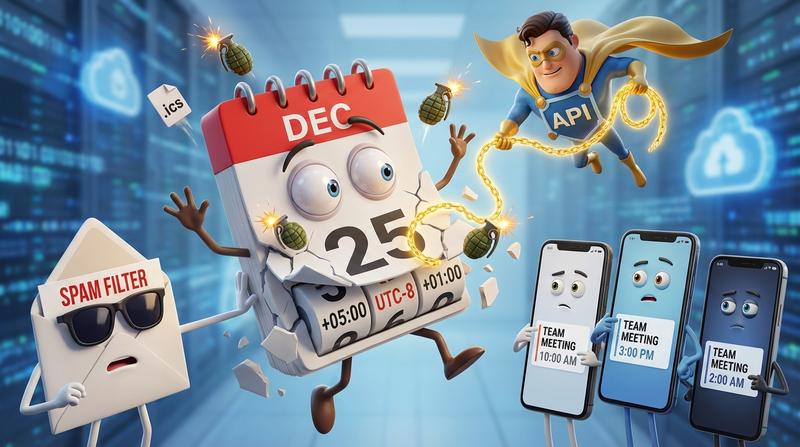
Have you ever worked with timezones? Crazy thing. Your event at 2pm PST displays as 5pm EST... unless the user's calendar app doesn't properly parse the timezone data. Then it shows as 10pm UTC. Or 2pm local time. Or nothing at all.
When Your Automation Fires But the .ics File Dies in Transit
This is where it gets frustrating.
Your Zapier/Make workflow fires successfully. You can see it in the logs. The .ics file was generated. The email was sent. Everything looks green.
But ICS file attachments face serious deliverability challenges. Email attachments containing .ics files often trigger spam filters and render differently across platforms. This leads to:
- Silent failures (email lands in spam, user never sees it)
- Partial rendering (event shows but time is wrong)
- Complete rejection (corporate firewalls block attachments)
The worst part? You'll never know it happened. There's no bounce-back. No error message. Just a confused customer wondering why they missed the meeting.
Section 2: The Anatomy of a Working Calendar Share Workflow 🛠️
What Actually Needs to Happen Between Trigger and Calendar
Let's break this down. For a calendar event to successfully land in someone's calendar, your workflow needs to:
- Generate valid calendar data (with correct timezone handling)
- Deliver that data in a format the recipient can use
- Render properly in whatever calendar app they're using
Sounds simple. It's not.
The Three Failure Points
Point 1: Generation 💔
Most no-code tools generate basic .ics files. They work... sometimes. But they often miss:
- Proper VTIMEZONE components
- Recurring event handling
- Calendar-specific metadata
Point 2: Delivery 💔
Email deliverability for attachments is a nightmare. Even if you use a reputable ESP, understanding why email calendar links fail reveals that only 57% of webinar registrations convert to actual attendees - and broken calendar links are a major culprit.
Point 3: Rendering 💔
Even when the file arrives, Gmail handles it differently than Outlook. Outlook handles it differently than Apple Calendar. And don't even get me started on Samsung's calendar app.
Why Most No-Code Solutions Skip the Hard Parts
Here's the thing:
Zapier, Make, and n8n are incredible tools. I use them daily. But they're general-purpose platforms.
They weren't built to handle the specific complexity of calendar event distribution. They can send an email with an attachment. They can trigger a webhook. But the nuanced work of generating universally-compatible calendar data, handling timezone conversion, and ensuring cross-platform rendering?
That's not their job. And that's okay - as long as you know to fill that gap.
Section 3: Building Bulletproof Event Sharing with Zapier/Make/n8n 💡
The Middleware Approach
The solution isn't to abandon your automation tools. It's to add a dedicated calendar node - a specialized layer that handles all the calendar complexity so your workflow doesn't have to.
Think of it like this:
"Do one thing and do it well." - Unix philosophy
Your Zapier/Make/n8n workflow handles triggers, logic, and routing. A dedicated calendar service handles generation, formatting, and delivery optimization.
Connecting Your CRM Data to Calendar-Ready Output
The workflow should look like this:
- Trigger: New registration/booking/signup in your system
- Action 1: Capture event details (date, time, location, description)
- Action 2: Send data to calendar middleware via API
- Action 3: Return a smart calendar link (not an attachment)
- Final Action: Deliver that link via email/SMS/notification
This approach lets you automate your event data pipeline with an add to calendar button that eliminates copy-paste errors and keeps systems in sync.
How Add to Calendar PRO's API Becomes the Reliable Action in Your Chain
Here's where the stack gets powerful.
Add to Calendar PRO's API provides endpoints for event creation, updates, and management with real-time webhook notifications. Instead of generating .ics files yourself (and praying they work), you send your event data to the API and receive back:
- A hosted calendar link that works across all platforms
- Automatic timezone detection and conversion
- Support for Google, Apple, Outlook, and other calendar types
- Analytics on who actually added the event
The API becomes a reliable "action" in your automation chain - one that handles all the edge cases so you don't have to.
Real Workflow Example: Registration → CRM → Calendar Event Delivered
Scenario: New webinar registration comes in
| Step | Tool | Action |
|---|---|---|
| 1 | Typeform | New submission triggers workflow |
| 2 | Zapier | Parses registration data |
| 3 | HubSpot | Creates/updates contact record |
| 4 | Add to Calendar PRO API | Generates hosted calendar link |
| 5 | ActiveCampaign | Sends confirmation email with link |
| 6 | Slack | Notifies team of new registration |
The calendar link in step 4 isn't an attachment - it's a dynamic URL that:
- Detects the user's device and browser
- Offers buttons for their preferred calendar app
- Handles timezones automatically
- Can be updated if event details change
Section 4: Beyond Single Events - Scaling to Hundreds 🚀
Batch Operations Without Manual Touching
What happens when you're not dealing with one event, but hundreds?
Maybe you're:
- Running a conference with 50 sessions
- Managing a training program with weekly cohorts
- Coordinating regional events across multiple timezones
Manual calendar management at this scale is a nightmare. But here's the good news: the no-code platform market is exploding, projected to reach $264 billion by 2032. This growth is driven by exactly this use case - operations teams needing to automate at scale without writing custom code.
With the right middleware approach, you can:
- Create events in bulk via API
- Update all instances when details change
- Track engagement across your entire event catalog
Keeping Events Updated When Details Change
Plans change. Speakers cancel. Venues relocate. Timeslots shift.
With static .ics files, you're stuck. The file was sent. The event data is baked in. Your only option is to send another email asking people to delete the old event and add a new one. (Good luck with that.)
Dynamic calendar links solve this elegantly. The event updates automatically because the link points to hosted data - not a static file.
The Subscription Trap vs. Dynamic Link Approach
Some solutions use calendar subscriptions (webcal:// links) for updates. But there's a catch:
- Subscription feeds refresh on unpredictable schedules
- Users have to manually subscribe (friction)
- Many corporate firewalls block webcal protocols
- You lose the "moment of commitment" when they click to add
The dynamic link approach gives you the best of both worlds: easy one-click adding with the ability to push updates when needed.
Conclusion: Your Automation Should Share Calendar Events That Actually Work ✅
Let's be honest.
You didn't become an operations manager or automation builder to debug silent calendar failures. You did it to eliminate manual tasks, create efficient workflows, and get back to strategic work.
The problem isn't your skills. It isn't your automation platform. It's that calendar event distribution is genuinley hard - and it requires specialized handling.
Here's what we've learned:
- Calendar automations fail silently - you won't know until someone complains
- ICS files face deliverability and rendering issues across platforms
- The middleware approach (dedicated calendar node) solves generation, delivery, and rendering
- Dynamic links beat static attachments for scale and flexibility
- Proper automation delivers 25-30% productivity gains with 40-75% error reduction
Stop debugging silent failures. Stop wondering why events don't arrive. Stop manually checking if your workflow "actually worked this time."
Let the calendar node handle the complexity while you handle the strategy.
Your automation stack should work for you - and that includes the tricky bits. Especially the tricky bits. 🚀